Treellis
Exposing Editable Assembly Structures for Progressive
Human-AI Co-Creation of 3D Models
Yixiang Chen · Adele Tong · Praneeth Perera · Chuancheng Shi · Per Ola Kristensson · Zhiyong Wang · Rajesh Balan · Alistair McEwan · Zhanna Sarsenbayeva · Anusha Withana
Runs in your browser

Overview
Generative AI lowers the barriers to 3D modeling but offers limited control over outcomes. Prompt-only tools return a finished model with little visibility into how it is constructed, so fixing one part often means re-prompting and watching unrelated parts change.
Treellis is a human-AI co-creation tool for 3D modeling. Given a text prompt, it produces a 3D object along with an interface that reveals its component-level assembly structure and in-situ editable parameters. Users can inspect and iteratively refine problematic regions at multiple levels of granularity, using both AI-assisted operations and direct manual edits, while keeping the parts that already work.
How It Works
One shared scene representation, three synchronized views: Prompt Input, 3D Viewport, Structure Tree and Parameter Panel.
Generate
Describe an object in natural language. Treellis returns a 3D model together with its assembly structure and object-specific parameters.
Inspect & Target
Hover or click in the Structure Tree or the 3D viewport. Selections are cross-highlighted, so you always know which part you are about to change.
Refine Locally
Adjust parameters with sliders, add, remove or reorganise nodes by hand, or prompt the AI on just the selected subtree, leaving the rest of the model untouched.
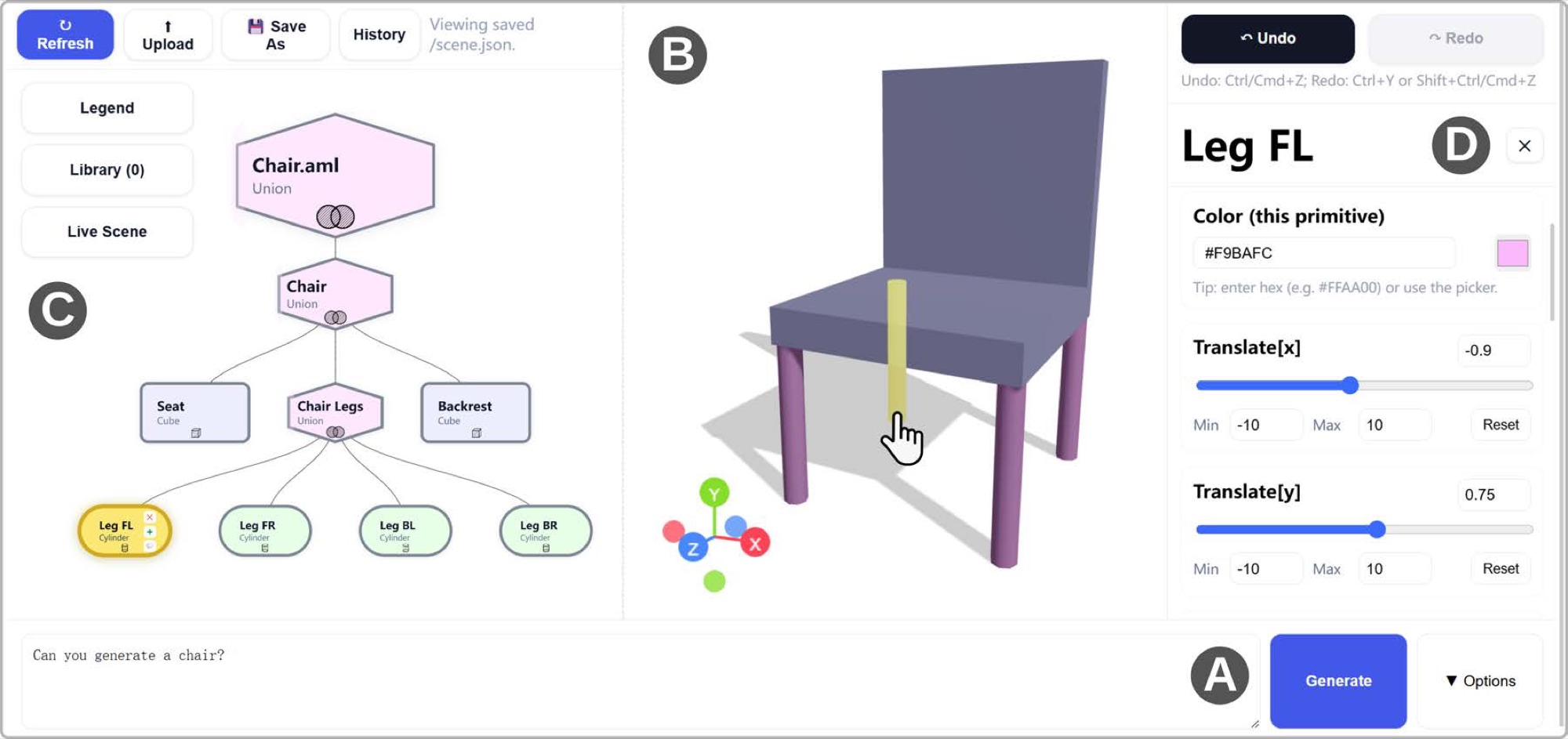
The Treellis workspace: (A) Prompt Input, (B) Viewport, (C) Structure Tree, (D) Parameter Panel.
From Prompt to Progressive Refinement
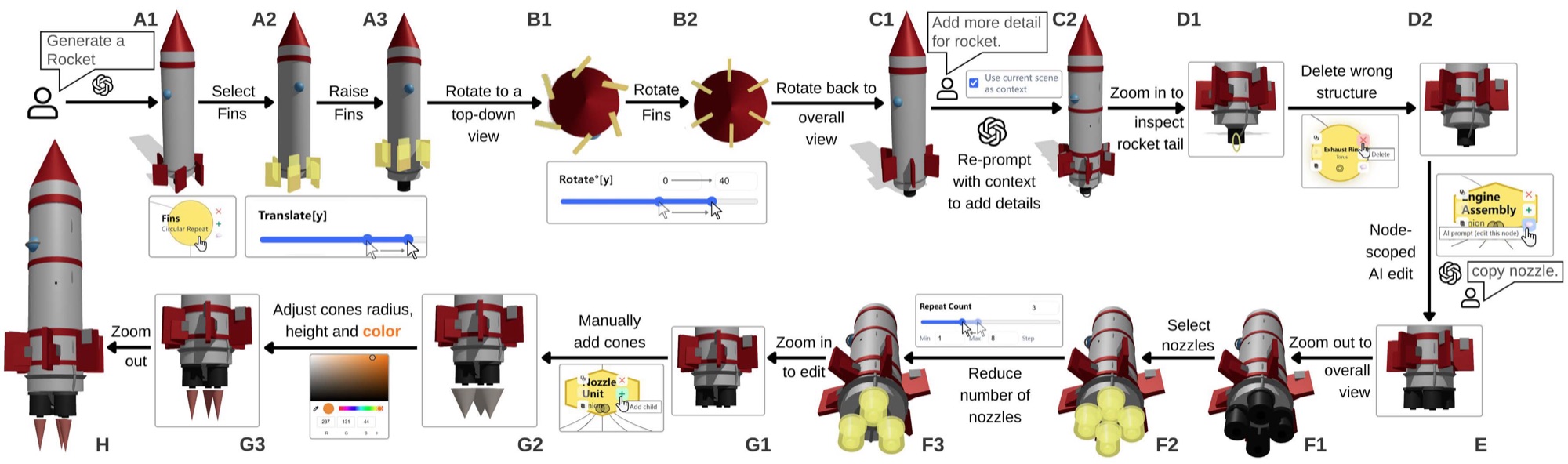
Building a rocket: fix fin placement with sliders, reprompt with scene context for detail, then repair the tail through local deletion, node-scoped AI edits, repeat adjustment and manual node addition.
Key Results
A controlled between-subjects study (N=24) against a prompt-only baseline, and a multi-session open-ended design study (N=5).
Made with Treellis
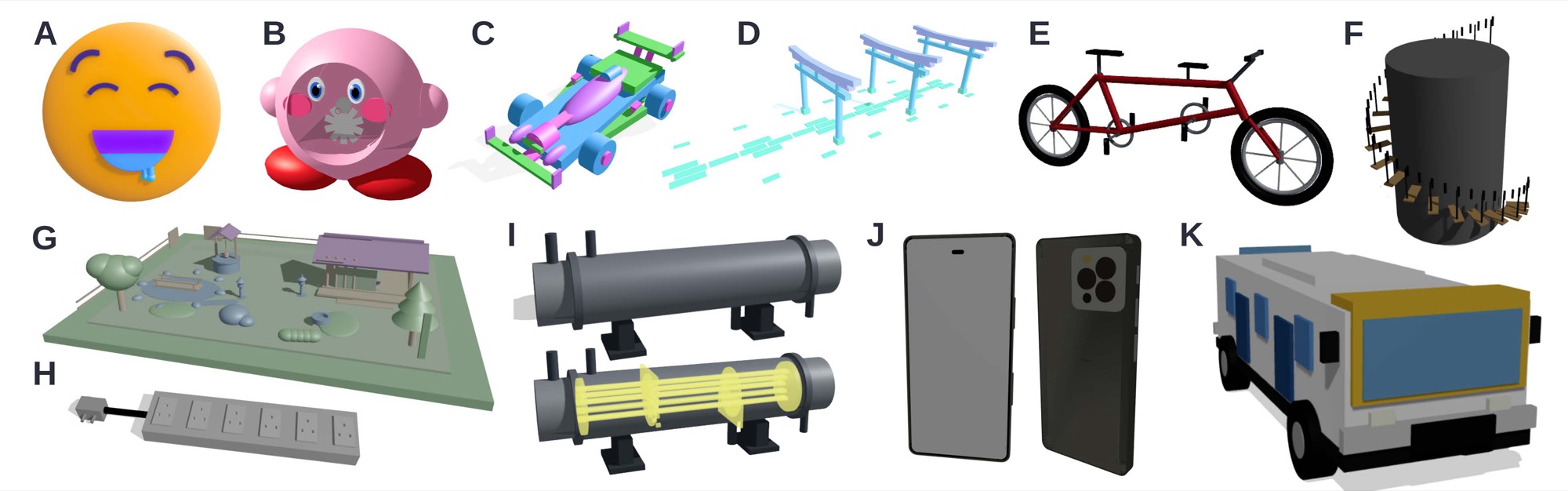
Selected models created by study participants, from emoji and toy cars to a courtyard and a heat exchanger with internal structure.
Authors




Publication
Treellis: Exposing Editable Assembly Structures for Progressive Human-AI Co-Creation of 3D Models
Y Chen, A Tong, P Perera, C Shi, PO Kristensson, Z Wang, R Balan, A McEwan, Z Sarsenbayeva, A Withana
Build your own 3D model
Treellis is open-source and runs entirely in the browser. No installation needed.
Try Treellis now